Skip to Main Content






Category Archive: Knowledge Base
This content is marked deprecated
By Ross Madden
August 22, 2011 1:29 pm MT
Posted in Knowledge Base, Software
By Ross Madden
August 22, 2011 1:29 pm MT
Posted in Knowledge Base, Software
THIS POST IS DEPRECATED! New instructions are on the following post: https://cnsit.colostate.edu/kb/bc401-chime-installation-instructions Insert BC401 CD into your CD drive. Copy the BC401_2009 folder from the CD onto your computer hard drive. Copy it to a place where you will remember where it is. Go to the BC401_2009 folder on your hard drive and open the […]
This content is marked deprecated
By Ross Madden
July 26, 2011 1:31 pm MT
Posted in Knowledge Base, Pangea
By Ross Madden
July 26, 2011 1:31 pm MT
Posted in Knowledge Base, Pangea
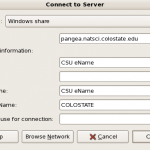
When logged in you will navigate to the ‘Places’ menu, and find the ‘Connect to Server’ option. This will bring up the following dialog window. Set the values to mimic those shown in the screenshot below. ‘CSU eName’ is your CSU eName. Please note that the Server below is for the CNSIT Pangea installation. Server: […]
Here’s a cheat sheet for Samba syntax – used to mount SMB/Linux/Windows shares on Windows, OSX, and Linux systems: Basic form: smb://[[[authdomain;]user@]host[:port][/share[/dirpath][/name]]][?context] UNC FORM URL FORM \\host\share smb://host/share \\host\share\dirpath smb://host/share/dirpath \\host\share\dirpath\filename smb://host/share/dirpath/filename Examples: smb://host/share/ smb://host/share/dirpath smb://host/share/name smb://host/share/dirpath/name smb://WORKGROUP@host/share smb://WORKGROUP;User@host/share Usually the name of the share must be specified. Shared disks are specified with a trailing […]
Windows 7 (please tell me you are not running this any more …) – Click the Start icon – Click Control Panel – Select Large icons for the View – Click Network and Sharing Center – Select Change Adapter Settings from the list on the left hand side – Right click on the connection you […]
The official Microsoft explanation states that “The terms 32-bit and 64-bit refer to the way a computer’s processor (also called a CPU), handles information. The 64-bit version of Windows handles large amounts of random access memory (RAM) more effectively than a 32-bit system.” (http://windowshelp.microsoft.com) Essentially, what this means is that a 32 bit operating system […]
This content is marked deprecated
By Ross Madden
September 15, 2009 8:52 am MT
Posted in General Computing, Internet & Networking, Knowledge Base
By Ross Madden
September 15, 2009 8:52 am MT
Posted in General Computing, Internet & Networking, Knowledge Base
This how to is designed to show users how they can connect to their office computer from home. At the time of this writing these directions will only work if the office computer on campus is a Windows computer. These directions also assume the following: – Power. You cannot work from home if the power […]
Most of the time a new toner cartridge will come with an adhesive postage sticker you can affix to the old toner box when you are done with it. However, more often than not, these stickers are lost or accidentally thrown away. Luckily, you can usually find the directions for printing your own return label […]
This content is marked deprecated
By Ross Madden
September 4, 2009 11:04 am MT
Posted in Knowledge Base, Pangea
By Ross Madden
September 4, 2009 11:04 am MT
Posted in Knowledge Base, Pangea
Symptoms When attempting to connect to Pangea, the connection application will spit back an Error 86 (network password incorrect). Solution for Windows 7 Professional To solve this you will need to edit a Local Security Policy and set one of the entries to something other than “Not Defined” as it is on default. First, enter […]
This content is marked deprecated
By Ross Madden
September 4, 2009 8:56 am MT
Posted in Internet & Networking, Knowledge Base
By Ross Madden
September 4, 2009 8:56 am MT
Posted in Internet & Networking, Knowledge Base
Here are new directions on using the Network Connect SSL application through the Secure Gateway: https://cnsit.colostate.edu/kb/how-to-connect-to-the-secure-colostate-gateway
Before requesting help from CNSIT, make sure that this jack is indeed inactive. First, the jack must be a RED jack – any other color is either a building relic or a voice line rather than a data line. To test that this RED jack is off, all you need to do is simply plug […]
